


Goodbudget: Budget & Finance
3.34.87K Reviews
App Specs
- Version
- 2.22.25023
- Updated On
- License
- Free
- Downloads
- 1,000,000+
- Developer
- Dayspring Partners
- Categories
- Finance
- Platform
- Android
Screenshots
 Analysis by AppCompare
When I compare budgeting apps, I start with one practical question: do I want a tool to sort out spending after the fact, or a plan that tells me what my money is for before I spend it? Goodbudget: Budget & Finance is built around the second approach. It suits people willing to decide in advance how much belongs in each part of their life, then check those limits as they go. If that kind of hands-on planning sounds helpful rather than restrictive, it is worth a look.
Choose a budgeting style you’ll actually keep using
Goodbudget is a finance app from Dayspring Partners, organized around digital envelopes: you set aside money for categories such as groceries, rent, and entertainment, then record spending against those plans. I find that choice more important than a long feature list. A budget only helps if its routine fits your habits, and this one asks you to participate rather than quietly doing the bookkeeping for you.
That makes the app a particularly good match for someone who wants to curb overspending in a few specific areas, or for a household that needs a shared view of planned expenses. It can also help when income arrives in chunks and you want to assign it deliberately instead of treating the balance in your account as all available to spend. It is less appealing if you want a budget to build itself from automatically imported transactions.
How the envelope method changes everyday decisions
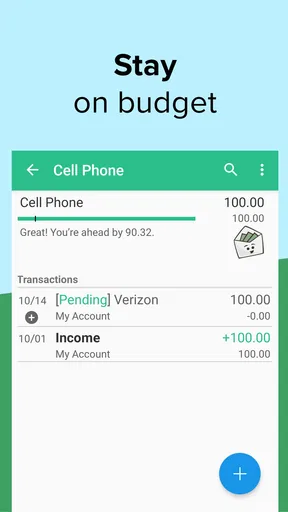
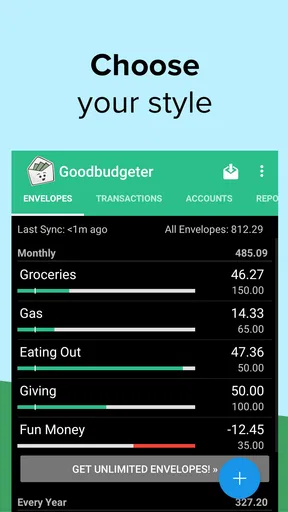
The useful shift is from asking, “How much is in my account?” to asking, “How much have I set aside for this?” Imagine checking your grocery envelope before a midweek shop. If it is running low, you can decide whether to adjust another category or change what goes in the basket. That small pause makes a planned limit concrete; it is more actionable than noticing at the end of the month that food spending was higher than expected.
I also like the envelope method for expenses that are easy to underestimate because they do not happen every week. Setting money aside gradually for a gift, a trip, or a household purchase can make the eventual bill feel less like a surprise. The trade-off is that you have to think through categories ahead of time. A plan that is too detailed can become a chore, so I would begin with a manageable set of envelopes and add more only when a real spending pattern calls for one.
Using Goodbudget in daily life
So, you download Goodbudget, and right off the bat, the setup is pretty straightforward. No fuss, no muss. You create an account, and bam, you're in. The app's interface is clean, intuitive, and dare I say, quite friendly. It’s like it’s gently guiding you into the world of budgeting without making you feel overwhelmed.
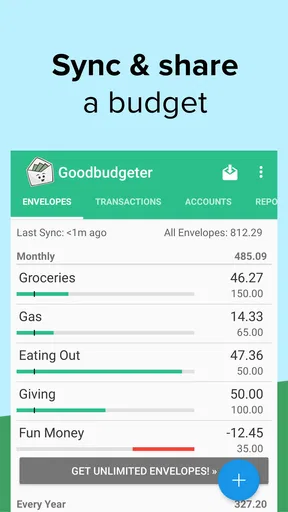
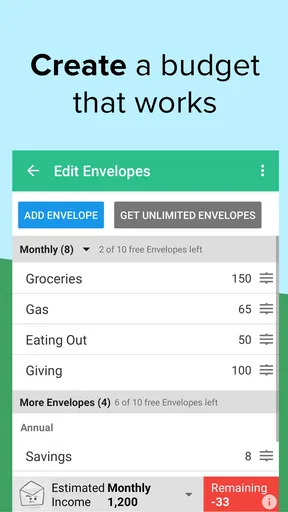
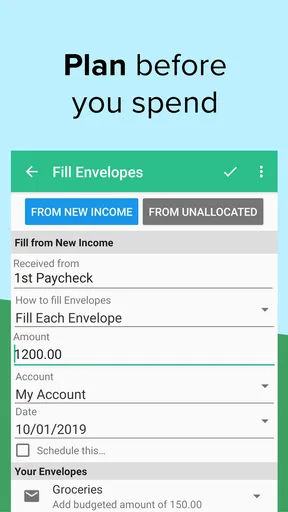
The first thing you'll do is set up your "envelopes." This is where you allocate your funds into different categories like groceries, rent, entertainment, and so on. It’s basically like stuffing cash into actual envelopes, but without the risk of losing a tenner on the subway. Plus, you can easily adjust each envelope as your needs change. Flexibility is key here!
Worth Reading Before You Choose

EA SPORTS FC Mobile 26 Is a Bigger Football Game, but It Takes Time

Flipboard Shows What News Apps Must Do Beyond the Feed

Switching to Android Auto Means Rethinking Your Driving Routine

Google Calendar Makes a Crowded Week Easier to Manage

Ludo King Makes the Most of the Minutes Between Plans

Baby Panda World Brings Quick Play to Modern Phones, but Its Game Library Feels Busy
Features That Stand Out
One feature I really appreciate is the ability to sync the app across devices. Whether you're on your phone, tablet, or computer, your budget is always up to date. It's a godsend for families or partners who need to stay on the same financial page. No more awkward conversations about who spent what on takeout last Friday!
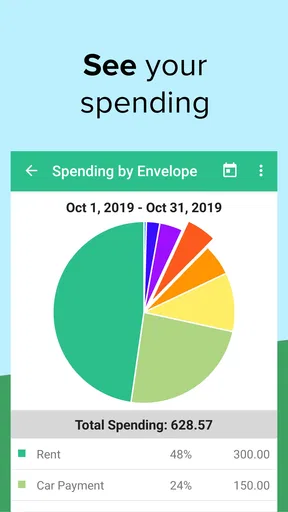
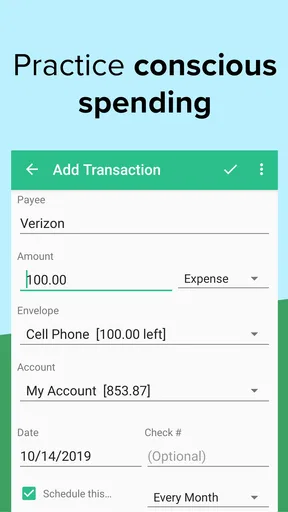
The transaction tracking is another winner. You can manually enter your expenses, which might sound tedious, but it actually helps you stay aware of your spending habits. Knowledge is power, folks! Plus, there are handy reports that break down your spending, so you can see exactly where your money is going. It’s eye-opening, to say the least.
Make the routine easier to maintain
Manual entry is the app’s central trade-off, so I would build it into an existing habit instead of relying on memory. For example, after a grocery run, record the purchase while the receipt is still in your hand and assign it to the right envelope. If you share the budget, agree on a simple rule for who records shared expenses and when. That avoids a common problem with manual systems: a perfectly sensible plan that slowly becomes inaccurate because one person forgets to log purchases.
There is also a useful distinction between recording a transaction and judging yourself for it. If an envelope runs short, the information can help you revise next month’s plan rather than treat the budget as a pass-or-fail test. I would use the reports to spot repeated mismatches—perhaps a category is consistently underfunded—then adjust the allocation. That is more productive than making every category unrealistically tight and abandoning the routine after an expensive week.
Why You’ll Love It
One of the things I love most about Goodbudget is its simplicity. It's not cluttered with unnecessary features. Instead, it focuses on what really matters: helping you manage your money better. No ads popping up every five seconds, no hidden fees lurking around the corner. Just pure, unadulterated budgeting goodness.
Another highlight is the community support. Goodbudget offers a helpful online community and various resources like blogs and podcasts to keep you motivated and informed. It’s like having a bunch of budgeting buddies cheering you on, which is always nice when you’re trying to make those dollars stretch further.
Where other finance apps may fit better
Compared with automatic-tracking tools, Goodbudget puts more responsibility on you. That can be a strength if you want to notice purchases as they happen, but it is a real drawback if you have many small transactions or rarely have time to update a budget. A bank-linked tracker may suit someone who mainly wants a convenient record of account activity. Goodbudget makes more sense when the planning step itself is the point.
It also differs from a basic spreadsheet. A spreadsheet can be shaped around almost any system, but you have to build and maintain that structure yourself. Goodbudget gives you a ready-made envelope approach and shared syncing, which can be easier for a household to follow. On the other hand, someone who enjoys custom formulas, unusual categories, or detailed financial modeling may prefer the control of a spreadsheet. Neither style is automatically better; the useful one is the one you will keep current.
For someone who only wants to check an account balance, a budgeting app may be more process than they need. For someone who wants a clear spending plan and is prepared to enter purchases, the envelope structure has a more direct purpose. I would not choose Goodbudget expecting it to replace every financial tool: its value is in organizing a budget, not in making manual effort disappear.
Some Things to Consider
While Goodbudget is great, it's not without its quirks. For one, it doesn't connect directly to your bank accounts. This means you have to enter transactions manually, which can be a bummer if you're used to automatic syncing. However, I found that this manual process actually made me more mindful of my spending, so it’s a trade-off.
Also, the free version has some limitations, like the number of envelopes you can create. If you're a budgeting newbie, this might not be an issue, but if you're managing a complex budget, you might want to consider the paid version. But hey, it’s a small price to pay for financial peace of mind, right?
What to know before committing
Goodbudget is free to start, with in-app purchases ranging from $0.99 to $69.99 per item. I would first try a small, realistic budget and see whether the envelope routine sticks before paying for more capacity. If you already know you need many categories, check how the available plan limits line up with your setup rather than assuming the free option will cover every household’s needs. The app is rated for Everyone, and its current version is 2.22.25023, with Android 10 as the minimum operating system.
Switching to any envelope budget takes a little preparation. You need to decide which categories matter, work out how much to assign, and record transactions consistently. I would avoid importing every detail of an old budget at once; start with the categories that influence your decisions most, such as groceries, bills, and discretionary spending. Once those are working, expand the setup. This keeps the first week from turning into an administrative project.
The app’s average rating is 3.3 from around 19,000 ratings, and it has more than 1 million installs. I take that as a reason to judge it by fit, not popularity alone: manual entry and envelope planning are exactly what some people value and what others find tiring. If your main concern is convenience with minimal input, that mismatch matters more than whether you like the interface.
The Final Verdict
In the end, Goodbudget: Budget & Finance is a fantastic tool for anyone looking to take control of their finances. It's straightforward, effective, and user-friendly. Whether you're a budgeting veteran or just starting out, this app offers something valuable. Sure, it might not have all the bells and whistles of some other finance apps, but what it does, it does well.
So, if you're ready to say goodbye to financial chaos and hello to a more organized, stress-free money management system, give Goodbudget a try. Your future self will thank you!
My recommendation
My recommendation is simple: try it if you want to make spending decisions before you tap your card, and especially if a partner or family member needs to work from the same plan. Keep the first version of your budget modest, record purchases at a consistent moment, and treat category limits as something to refine rather than rules you can never change. That gives the method a fair test without making it harder than it needs to be.
I would skip it if automatic bank syncing is essential to you, if you dislike logging purchases, or if your preferred system depends on highly customized analysis. In those cases, an automatic tracker or a flexible spreadsheet may feel more natural. For everyone else who wants a hands-on way to give everyday money a clear purpose, Goodbudget is worth trying—provided you are comfortable doing your part to keep the picture accurate.
Pros
- User-friendly interface for easy navigation.
- Syncs across multiple devices seamlessly.
- Offers robust envelope budgeting system.
- Provides insightful spending reports.
- No ads in the free version.
Cons
- Limited features in the free version.
- No automatic transaction import.
- Lacks investment tracking option.
- Requires manual transaction entry.
- No bill payment reminders.
FAQs for Goodbudget: Budget & Finance
What is Goodbudget and how does it work?
Goodbudget is a personal finance app designed to help users manage their money by using the envelope budgeting method. It allows you to allocate your income into different categories or 'envelopes' for various expenses, helping you track spending and savings goals. The app syncs across devices, so you can manage your budget on the go.
Is Goodbudget available for both Android and iOS devices?
Yes, Goodbudget is available for download on both Android and iOS platforms. You can find the app in the Google Play Store for Android devices and in the Apple App Store for iOS devices, making it accessible for most smartphone users. It also offers a web version for desktop use.
Does Goodbudget offer any synchronization features?
Goodbudget offers robust synchronization features, allowing multiple users to access the same budget. This is particularly useful for families or couples who want to manage their finances together. Changes made on one device are automatically updated on all synced devices, ensuring everyone is on the same page.
Are there any costs associated with using Goodbudget?
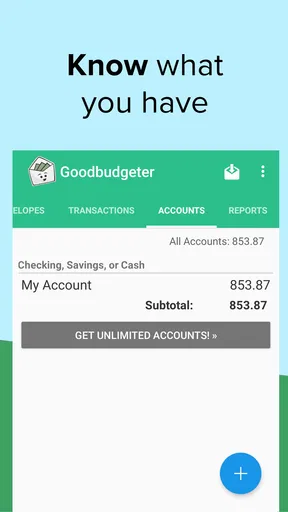
Goodbudget offers a free version with basic features suitable for personal use. However, for more advanced features like unlimited envelopes and accounts, users can opt for the Plus version, which requires a subscription fee. This premium version provides more flexibility and detailed financial tracking.
What are the main benefits of using Goodbudget over other budgeting apps?
Goodbudget stands out due to its simple envelope budgeting system, which is easy to understand and use. It’s ideal for users who prefer a manual approach to managing finances. The app’s ability to sync across devices and its focus on budgeting rather than linking bank accounts makes it a secure choice for privacy-conscious users.


